
Pink Zebra Wallpaper premium1.1.1 - Google Play
You'll be able to see results in few seconds.
Publisher Description
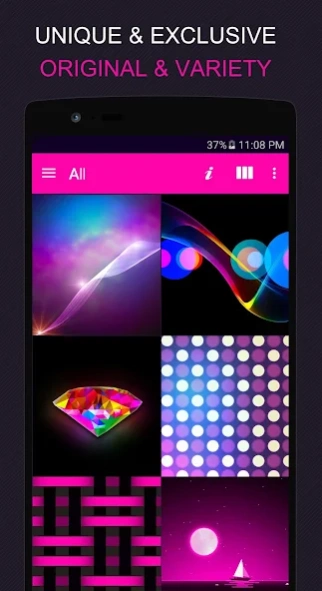
Premium version for Pink Zebra wallpaper and sms theme.
What is it?Pink Zebra
is a two-in-one app. NEW for 2016:
(1)
Customize your phone screen in style with hundreds of unique and exclusive wallpapers by XOTHEMES.
(2)
Beautify your GO SMS messaging app's screen with pink zebra theme loved by over 2 million downloaders.
Exclusive by XOTHEMES
♥ You get tons of professional features (see below for more details)
♥ Daily wallpaper update
♥ You can save wallpaper to your device
♥ Our wallpapers are exclusively custom crafted by XOTHEMES designers.
♥ Frequently upload new wallpapers are delivered to your app (No annoying app update needed)
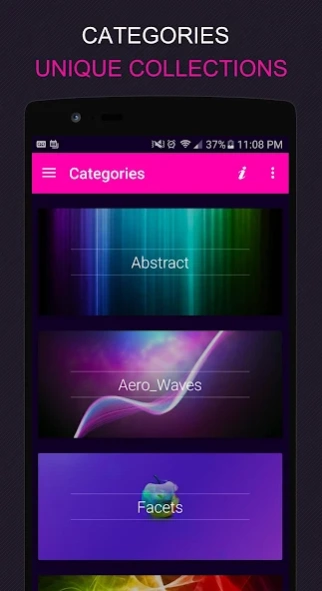
♥ Wallpapers are categorized in our beautiful Material Dashboard for your convenience.
♥ Beautiful interface, buttons, background and more for your GO SMS PRO messaging app.
Requirements:
• To apply wallpaper: No requirement except internet connection.
• To apply theme for messaging: "GO SMS PRO" app required. https://goo.gl/htB6CY
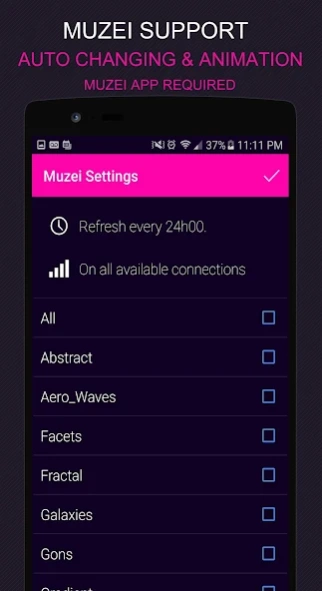
• To use Muzei Live wallpaper: "Muzei" app required. https://goo.gl/VDs9K8
• tap "i" in our app to for more information
Wallpaper Features
♥ New! Added 771 beautiful HD wallpapers. Uniquely designed by Michael Au
♥ I will upload wallpapers frequently. No annoying app update needed like other apps.
♥ Categorized in sections for your convenience
♥ New! Supports Muzei Live Wallpaper!
♥ New! Supports Android 4.0, 5.0, 6.0 and more
♥ New! Beautifully crafted Material Design Control Center "Dashboard"
♥ Hold the thumbnail of an image to INSTANTLY apply wallpaper
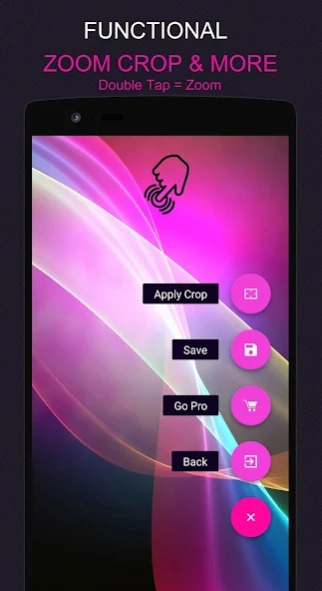
♥ Double Tap to Zoom wallpaper
♥ Buttons to crop the wallpaper and save wallpaper
(growing) Categories include: Abstract, Aero Waves, Facets, Fractal, Gons (Low Polygons), Gradient, Light Effects, Lines, Lucent (Glow effect), Material Design, Minimalist, Pattern, Pattern Glamour, Twill, Typography, Xplosions (Dispersion effect)
Theme Features for "GO SMS" app
• skin / theme for GO SMS Pro Application
• To Apply SMS theme: tap the 'i' in our dashboard for information
• Custom chat room, conversation list,
• Custom Chat Bubbles
• Custom top and bottom menu bars
• Custom interface color and font colors
About XOTHEMES
Stores on Google Play:
♥(1) in Search field, Type
pub: XOTHEMES
, or click short link: https://goo.gl/4O0JOL
♥(2) in Search field, Type
pub: THAAUS
, or click short link: https://goo.gl/EIhIq3
Comments/suggestion?
Connect to my network for new, free app releases.
Choose any of these:
GooglePlus Community: https://plus.google.com/communities/108429877838815336777
Facebook: http://www.facebook.com/xothemes
GooglePlus: https://plus.google.com/+MichaelAXoThemes/posts
Twitter: http://www.twitter.com/@xo_studio
Website: http://www.xothemes.com
Sincerely,
Michael Au
XOTHEMES &THAAUS
Disclaimer:
1. We are not affiliated with GO DEV (maker of GO SMS PRO application)
2. WIFI is recommended for using our wallpapers Dashboard.
3. YOU'RE NOT AUTHORIZED TO USE ANY IMAGE FROM THIS APP FOR YOUR PROJECT WITHOUT AUTHOR'S PERMISSION.
About Pink Zebra Wallpaper premium
The company that develops Pink Zebra Wallpaper premium is XOTHEMES. The latest version released by its developer is 1.1.1.
To install Pink Zebra Wallpaper premium on your Android device, just click the green Continue To App button above to start the installation process. The app is listed on our website since 2016-06-23 and was downloaded 0 times. We have already checked if the download link is safe, however for your own protection we recommend that you scan the downloaded app with your antivirus. Your antivirus may detect the Pink Zebra Wallpaper premium as malware if the download link to com.jb.gosms.theme.pinkzebrapaid is broken.
How to install Pink Zebra Wallpaper premium on your Android device:
- Click on the Continue To App button on our website. This will redirect you to Google Play.
- Once the Pink Zebra Wallpaper premium is shown in the Google Play listing of your Android device, you can start its download and installation. Tap on the Install button located below the search bar and to the right of the app icon.
- A pop-up window with the permissions required by Pink Zebra Wallpaper premium will be shown. Click on Accept to continue the process.
- Pink Zebra Wallpaper premium will be downloaded onto your device, displaying a progress. Once the download completes, the installation will start and you'll get a notification after the installation is finished.
Program Details
System requirements
Download information
Pricing
Version History
version 1.1.1
posted on 2016-06-23
Major update version1.1.24: sms theme is update and now has a large collection of wallpapers exclusively made by XOTHEMES.
version 1.0
posted on 2013-06-11
Several fixes and updates
Disclaimer
Official Google Play Link
We do not host Pink Zebra Wallpaper premium on our servers. We did not scan it for viruses, adware, spyware or other type of malware. This app is hosted by Google and passed their terms and conditions to be listed there. We recommend caution when installing it.
The Google Play link for Pink Zebra Wallpaper premium is provided to you by apps112.com without any warranties, representations or guarantees of any kind, so access it at your own risk.
If you have questions regarding this particular app contact the publisher directly. For questions about the functionalities of apps112.com contact us.
